
Curtain · privacy for your keyboard
Type in public.
Keep it yours.
Open your keyboard and a curtain falls over everything above it, so the person next to you can't read your chat. Your own text stays faintly readable. Hold to peek, let go to hide.
- Works with any keyboard
- Hold to peek
- Free core, no ads
- Android 8.0+
How it works
A curtain that falls where the glances land.
Curtain doesn't replace your keyboard or dim the whole day. It waits until you type, then covers only what a neighbour could read.
- 01
Open your keyboard
A small pill lands on top of it, just above the keys. Drag it wherever suits your thumb.
- 02
Tap the pill
The curtain falls over everything above the keyboard. Your chat is hidden from the seat next to you.
- 03
Hold to peek
Press and hold anywhere to lift it for a moment. Close the keyboard and the curtain goes with it.
What's inside
Small, quick, and honest.
A curtain, not a dim screen
It falls only while you type, over everything above the keyboard, status bar included. Close the keyboard and it lifts.
Hold to peek
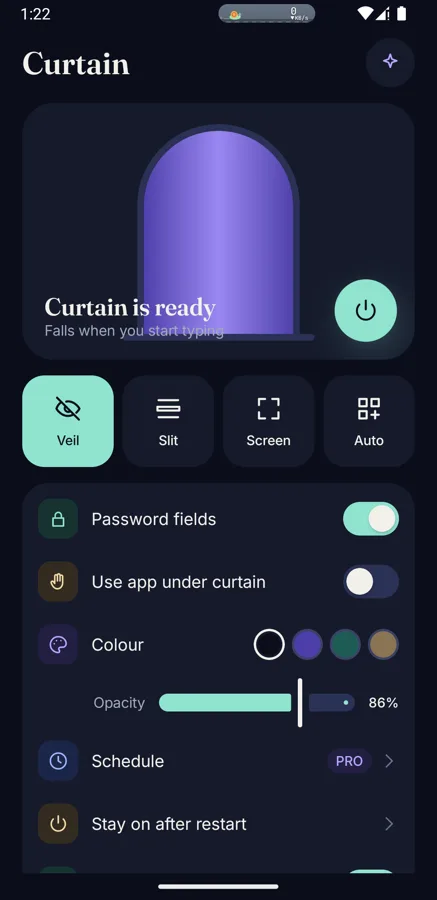
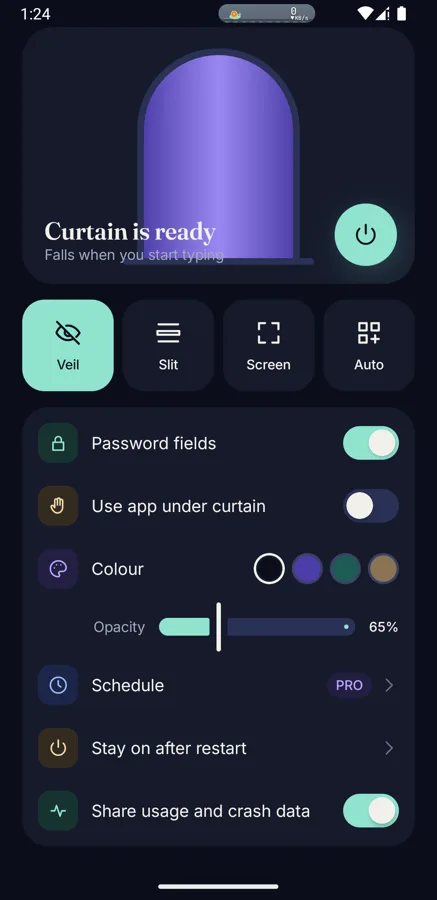
Press anywhere on the curtain and it lifts while you hold. Let go and it falls again. Optional touch-through lets you use the app underneath.
Password fields curtain themselves
Curtain notices the password flag on a field and falls on its own. It never sees what you enter.
Any keyboard, any app
No new keyboard to learn. The pill lands on the keyboard you already use and remembers where you parked it.
Whole-screen curtain
No keyboard needed: cover the whole screen from the notification, a Quick Settings tile or the widget.
Your colour, your opacity
Pick the curtain colour and how opaque it is. The default keeps your own text faintly readable.
Stays on after a restart
Armed once, ready again after a reboot. A per-brand guide helps phones that stop background apps.
Slit mode (Pro)
Cover everything except the single line you are typing in, for the most crowded commutes.
Privacy
It reads where the keyboard is. Never what you type.
To know when your keyboard opens, Curtain uses an Android accessibility service. It is used for that and nothing else, and the app explains it in plain words before you switch it on.
Curtain reads
- Where the keyboard sits on screen
- Which app is open
- Whether the focused field is a password field
Curtain never reads
- The text you type
- What is inside a field
- What is on your screen
Curtain is software, not a polarising filter. It hides your screen from a glance, and does not stop screenshots, recordings or cameras.
Questions
Everything people ask first.
What is Curtain?
Curtain is an Android app that hides your screen from people next to you while you type. When the keyboard opens, a small pill appears on it. Tap it and a curtain covers everything above the keyboard, so a neighbour in a metro, bus, queue or open office can't read your chat. Your own text stays faintly readable, and you can hold anywhere to peek.
Does Curtain work with any keyboard?
Yes. Curtain does not replace your keyboard. It sits above whichever one you use, such as Gboard, Samsung Keyboard or SwiftKey, and falls only over the part of the screen above it.
Can Curtain read what I type?
No. Curtain reads three things only: where the keyboard is on screen, which app is open, and whether the focused field is a password field. It never reads the text you type, the contents of a field, or what is on your screen.
Why does Curtain need an accessibility service?
Android only tells an app where the keyboard is, and when it opens or closes, through its accessibility service. Curtain uses that service for the keyboard's position, the foreground app and the password-field flag, and for nothing else. Before you switch it on, the app shows a plain-language disclosure of exactly what it reads.
Does Curtain stop screenshots or cameras?
No. Curtain is software, not a polarising filter. It hides your screen from a glance over your shoulder. It does not block screenshots, screen recordings or a camera pointed at the phone.
Is Curtain free?
The core curtain is free, with no ads. Extras such as a schedule and slit mode, which shows only the line you are typing, sit behind an optional one-time Pro unlock. Prices will be on the Google Play listing at launch.
What data does Curtain collect?
Curtain uses Firebase Analytics and Crashlytics to see which setup steps people get stuck on and to fix crashes, tagged with phone brand, Android version and keyboard family. It never logs what you type, field contents, screen contents or which apps you pick. A Share usage and crash data switch in Settings turns it off. The full policy is on the privacy page.
When can I get Curtain, and which phones does it support?
Curtain is in development and is coming soon to Google Play. It needs Android 8.0 or newer. Email soumya@lazycode.ai and you will hear when it is out.
Be first to know.
Curtain is coming soon to Google Play. Send a note and you will hear the day it is out.